
Describe an alert in plain words and read every mention in your language
Type what you want to know and Alerts finds the pages to watch, page alerts can now tell you when something becomes true, and mentions in other languages arrive translated.
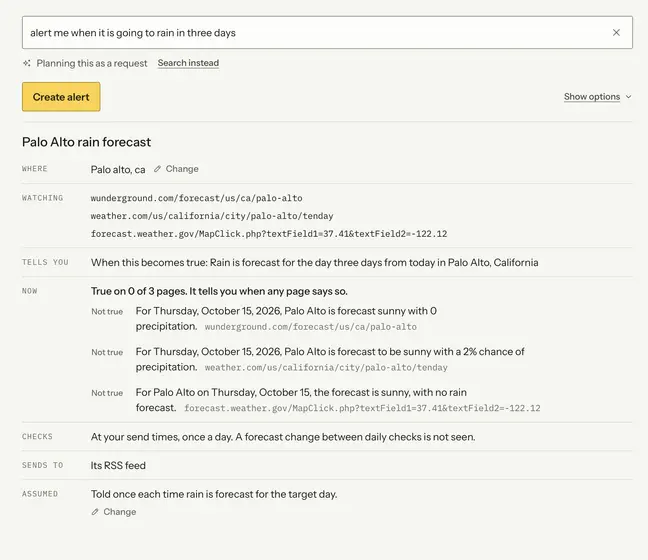
New
- Describe it, and we build it. Type "tell me when tickets for the Oakland show go on sale" and Alerts finds the pages, checks they answer it, then reads the plan back.
- Hear when something becomes true. A page alert can watch for a fact instead of any edit, or for a price that drops below a number you set.
- Read mentions in your language. Choose a language in Preferences and every mention written in another one shows a translation underneath, in the app, email and chat.
Improved
- Turn sentiment off. Negative and positive labels, counts and the dashboard can be switched off for your account or for a single alert.
- See exactly what your selector picks. The preview highlights the matched part right where it sits on the page, and says when it matches more than one thing.
Other improvements and fixes
- Check a page every hour or every 15 minutes.
- Watch up to five pages in one alert, like one product at several shops.
- Stop an alert after it first notifies you, or on a date.
- New items on a results page are opened and checked on their own page.
- Preferences shows what your alerts' AI calls have cost.
- Alert emails highlight the key words inside the change, not in a separate block.
- "As soon as found" is now called "Every 4 hours", which is what it did.