Verbs that can only cut, sharing from your phone, and shared documents that open instantly
Replaced the graded rewrite verbs with eight that mostly may only delete, gave the phone version a share sheet and an Insert menu, and made a shared document paint its text the moment you click it.
New
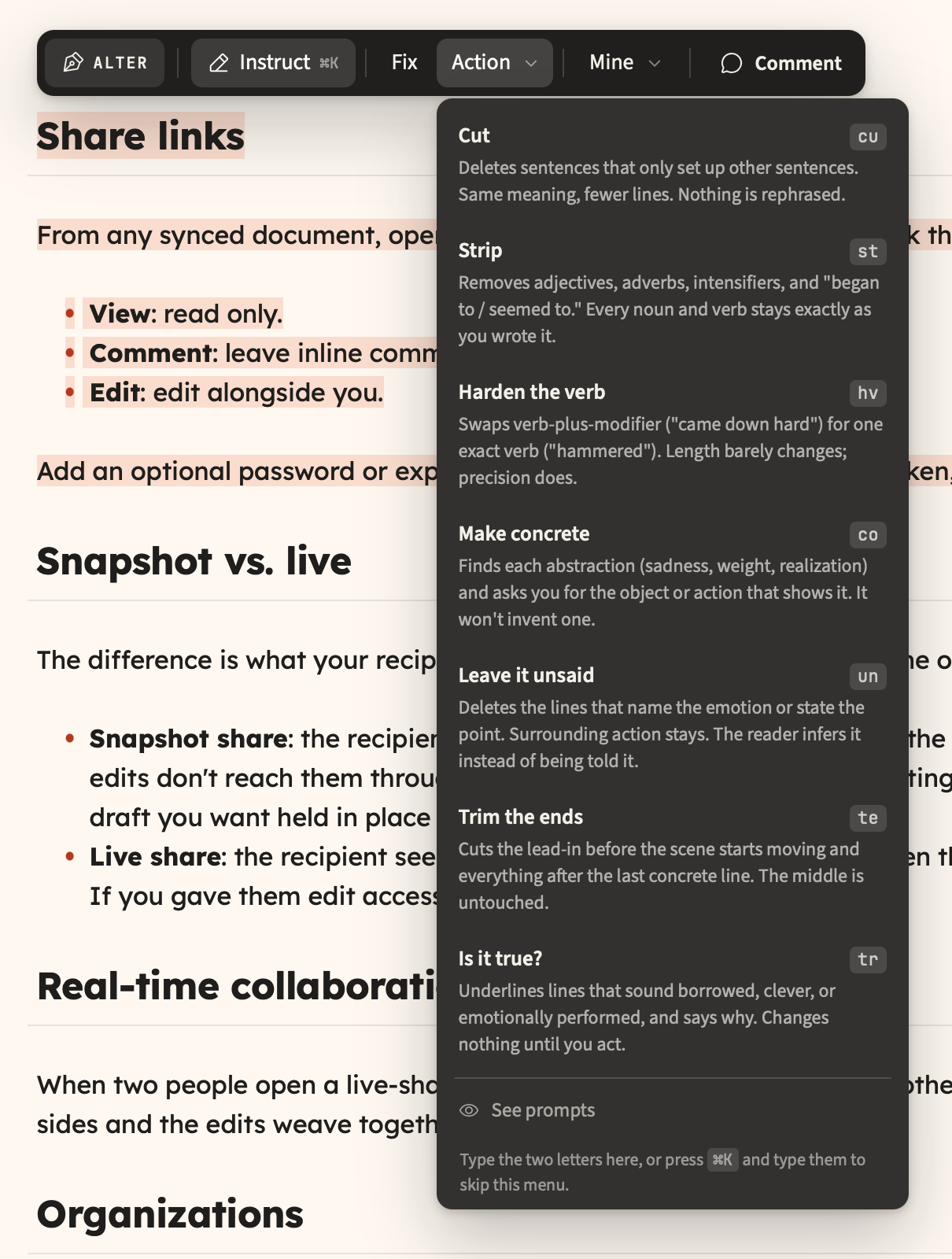
- Verbs that cannot rephrase you.
cut,strip,trimandunsaidmay only delete andtruthonly points, so every surviving character is one you typed. - Share from your phone. Below 1024px there was no share control anywhere, and the palette's Share document command had nothing listening to it.
- Insert without typing a slash. The phone formatting sheet leads with Insert, so tables, math, diagrams and media no longer cost three taps into the
123plane. - Shortcut hints in the status bar. Clickable chips for the command palette, a new document, a quick note and the assistant, with the real bindings read off the command registry.
Improved
- Shared documents open at the speed of your own. Clicking a shared row used to put the full-page startup logo between the click and text already stored on your device.
- The mobile review bar is one row. It was six stacked buttons taking 68% of a small phone; now about 68px, showing the change and stepping through them.
- Comments survive a bad connection. A single failed request used to empty the panel, the in-text highlights and the unread badge, with nothing to retry.
- A real offline page. The first offline visit used to be the bare word Offline in the browser's default font, and
/?doc=<id>had no cached page at all.
Other improvements and fixes
- The eight verbs moved into the Action menu with full labels; the ribbon keeps only
fix. - Type a verb's two-letter mnemonic in the Action menu or the instruct field.
- A verb now reports what it declined to change, instead of looking like it found nothing.
Mod+Kand the command palette work on shared/d/<id>pages.- New document is available on shared pages and in version history.
- New comments carry a dot in the panel, so the badge count is findable.
- Phone and tablet onboarding notes teach tap controls instead of key chords.
- Sidebar Sort by and Download flyouts are reachable on touch, including Manual drag order.
- Comments left through a share link are tagged via link, so a name cannot be borrowed.
- A broken share link names the failure and offers Retry instead of Go home.
- A comment share no longer opens onto an empty comments pane.
- Reopening a shared document in the same tab rejoins the live session.
- A shared document no longer hides its own heading a frame after it paints.
- Cached shared text is labelled read-only when the server cannot be reached.
- Opening a shared document no longer bounces its row to the end of the Shared list.
- The sidebar marker lands on the row you clicked, including pinned duplicates.
- A document that mentions
<script>or<textarea>keeps everything after it in exports. - A captioned image inside a code fence stops shifting every later figure number.
- Typewriter mode no longer switches itself off after keyboard motion.
- Backspace and Enter keep a heading inside its blockquote.
- The caret stops skipping a line at a hidden heading or quote marker.
- The selection ribbon stops doubling in height when you open its heading menu.
- A tap meant for Undo could land on an AI rewrite verb; the ribbon now clears the bar.
- Declining a tool approval on a phone no longer starts a whole-document Fix run.
- Two taps on a phone could delete the open document with no confirmation.
- Tapping a task checkbox no longer checks the one below it.
- The invisible fold chevron stops swallowing taps on the left of a heading.
- Reviews report changes dropped for overlapping another change.
- Version history names the comparison and tells the phone it is read-only.
- Brand red is darkened for text, so links and tags pass 4.5:1 contrast.
- The desktop review bar is translated; the mobile one already was.
- The assistant fails a stalled turn instead of spinning forever.
- The assistant can no longer act on a turn it already reported as timed out.
- Approving a note rewrite re-checks which note you are in, not the one you were.
- A document that hit its collaboration update budget no longer stops saving forever.
- A document whose body failed to download is fetched again instead of marked current.
- Trash loads in pages, and saves no longer scan the library for storage totals.
- About 80 KB of seed content and assistant code stops shipping to every visitor.
- The changelog poll no longer restarts on every background session refresh.
- A deploy mid-session no longer breaks the page with a module import error.
- A cancelled subscription can no longer be restored to premium by an MCP write.
- Share links redeem only share links, and trashed documents stop accepting grants.
- Favicon, link previews and robots.txt, plus a PWA splash in the app's own colour.